We've all had the experience of having a file on a USB suddenly disappear for unknown reasons. This is because the virus has penetrated the USB stick, causing the data to disappear or be hidden, affecting your work. And with cases like this, it is essential to use software that supports showing hidden files on USB. In this article, the Network Administrator will introduce you to the 7 most popular programs used to show hidden files on USB drives when attacked by viruses.
1. Recuva
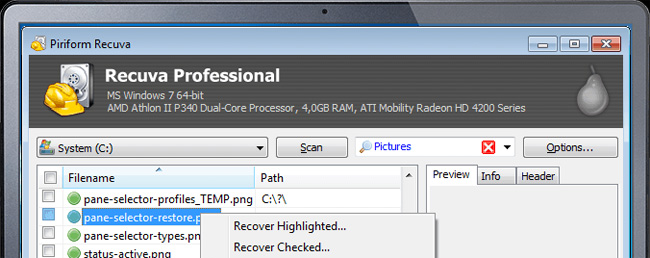
At the top of the list is Recuva software, capable of professional and efficient data recovery. If your USB has a file loss or hidden file situation, Recuva will help us get it back. In particular, Recuva can also restore data that we have deleted on the computer or when the computer has a problem that leads to data loss.
If those who do office work and often have to deal with Word documents use Recuva, it can also help restore Word format that has not been archived or has been damaged in the process. Users can retrieve those Word files from the document's temporary files.
Take a look at what features you can expect to find inside Recuva. The features below are a combination of what is included in the free as well as Professional versions:
File Recovery: As advertised on the website, you can recover any type of file with Recuva from any rewritable storage medium. This includes photos, documents, and music from devices such as USBs, SD cards, external hard drives, and more.
Virtual hard drive support: With the Professional version, you have the option to scan and recover data from the virtual hard drive.
Deep Scan: Can't find what you're looking for with a regular scan? The deep scan option provides a deeper look at your hard drive, but it will certainly take longer to scan than usual.
Secure Erase: If you want to make sure a file can't be recovered even after deletion, you can use Recuva's military-standard erasure technique to securely overwrite the data so that it can't be recovered by default. any guest.
Portable version available: When recovering data, the last thing you want to do is install new software that will overwrite your files. Recuva portable can be booted from USB to recover your files without risk of data loss.
While not all features are included in the free version, you still get a lot of access to what Recuva has to offer. You can try the free version first and consider upgrading later, depending on your needs.
2. Disk Drill
Disk Drill is an efficient and easy-to-use data recovery software that helps recover data lost due to viruses on computer systems and external devices such as memory cards, USB drives,... Everything you do is download Disk Drill, select the drive with the file to recover, then click Recover and wait for the software to scan.
However, the program only allows users to scan and preview hidden, lost files, allowing data recovery with a capacity of about 500MB. If you want to recover unlimited files and folders, you need to upgrade to the $89 paid version.
Software to show hidden files on USB Disk Drill
Download Disk Drill
3. FixAttrb Bkav
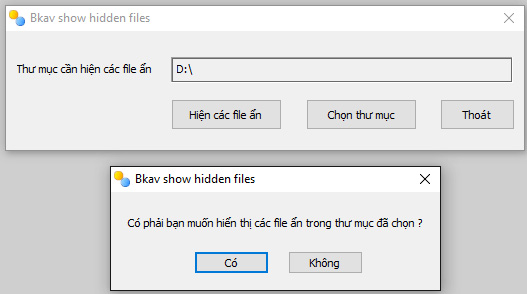
The FixAttrb Bkav tool, like Recuva software, is very effective at recovering hidden documents on USB. The software will change the properties of files, folders, or data hidden by viruses and then restore all this data. Furthermore, if your computer's drive is experiencing the same problem of being hidden, FixAttrb Bkav can restore the format of the hidden or lost file.
Download FixAttrb Bkav
4. USB Show
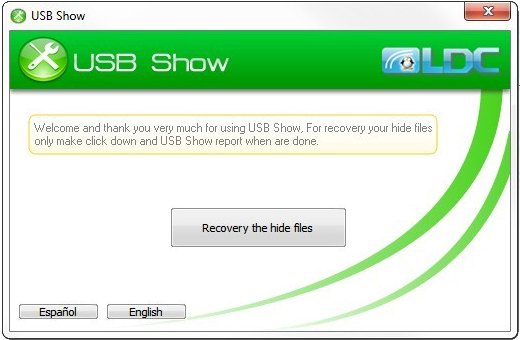
USB Show will help users recover hidden files and fix errors in USB due to virus attacks or other reasons. Besides, the software is also effective with hidden folders on the computer's Flash drives and hard drives when recovering data and folders that are hidden or deleted for various reasons. For hard drives, the performance of the software depends on the capacity of the hard drive and RAM memory.
Download USB Show
5. Smadav Antivirus
Smadav is one of the most effective offline antivirus programs. The program can automatically detect and scan your USB drive every time you plug it into your computer. In addition, Smadav is also one of the ways to show hidden files on your computer and USB drives, protecting your computer from virus attacks.
Show hidden files by using Smadav Antivirus
Download Smadav Antivirus
6. MiniTool Power Data Recovery
MiniTool Power Data Recovery is a free program that can be used to recover usage data in Windows 10/8/7. The program also allows users to recover hidden files on USB, SD memory card, hard disk or other storage devices easily and safely.
MiniTool Power Data Recovery can help you recover and restore files, folders, photos, videos, music, and other types of data.
MiniTool Power Data Recovery software to show hidden files
Download MiniTool Power Data Recovery
7. EaseUS Data Recovery Wizard
Another program you can use is EaseUS Data Recovery Wizard. This program can recover, show hidden files, and hide folders from a USB Flash Drive, Pen Drive, memory card, external hard drive,... very fast and easy to use.
Connect your USB Flash Drive, Pen Drive, hard drive to your computer and launch the EaseUS Data Recovery Wizard.
Software to show hidden files: EaseUS Data Recovery Wizard
Download EaseUS Data Recovery Wizard
Above are 7 useful software programs for recovering hidden files or deleted data on USB when infected by a virus or due to other errors. In addition, Recuva, FixAttrb Bkav and USB Show software also support displaying all types of files in folders on the computer's drive. These 7 programs are a good choice if you need to recover lost or deleted files.
See also the following articles:
Restoring the Windows PC with System Restore
Instructions to find and recover deleted data
How to fix the Windows 7/8/8.1/10 black screen error
One of the "worst" problems that users often encounter on Windows 10 is the black screen error.
The black screen error can occur in some situations on Windows 10, stemming from problems related to the graphics card, the connection error between the computer and your monitor, the error occurring during the installation of the operating system, updating to new versions, etc., or simply happening randomly at any time.
In the article below, the administrator will guide you with some solutions to fix the black Windows 10 screen error.
In addition, if you encounter a black screen error on Windows 7, 8, or 8.1 computers, readers can refer to the steps to fix the error here.
Steps to fix a basic black Windows 10 computer screen
1. Black screen error during installation
Once there, try turning off the computer by pressing and holding the power button for a few seconds. If using a laptop, you can unplug the charger and remove the battery.
Unplug all unnecessa...
Microsoft is currently A/B testing a native dark style for the ChatGPT-powered Bing.com, and it has finally begun distributing out Bing.com to Google Chrome and Safari. On Windows 10 and 11, we got a pop-up that allowed Bing AI access through Google Chrome. It appears that certain people can also access Bing AI through Safari.
One of the most cutting-edge and effective language models for users is Bing AI, which is powered on ChatGPT-4. Since late February, Bing.com AI support has been accessible to Microsoft Edge users. Now, Microsoft is beginning to expand its support to all browsers, including Google Chrome and Apple Safari.
Bing AI pop-up in Chrome | Image Courtesy: Thewindowsfan.com
Anyone may now test Bing AI in Chrome thanks to a new pop-up that has begun to show in the taskbar of Windows 10 or 11. In our experiments, Google Chrome's native dark mode support allowed us to access Bing AI. The screenshot below illustrates how the white background changes to a black...
I could write a whole novel about the peculiar dilemma of maintaining visual coherence in Windows 11. A presentation and summary could be made with the help of Microsoft's Copilot, but guess what? The issue would linger, waiting for the next act.
Despite being the best operating system for productivity and gaming, Windows 11 is still not a unified system. Windows 11 may have a newer look and feel, but it still has some vestiges of older versions.
When users attempt to switch from a Microsoft account to a local one, Windows 11 still refers to the Windows 8 "Search Charm," a bizarre case of inconsistent design. When users try to switch to a local account while device encryption is enabled, they are met with the screen shown below.
" data-sizes="(max-width: 1621px) 100vw, 1621px" /> Charm Bar is mentioned in Windows 11
Windows 8's specialized 'Search Charm' has been removed from later builds of the operating system. Users are st...




Nhận xét
Đăng nhận xét