Download and experience Windows 11 SuperLite, which is super smooth and super light
Nhận đường liên kết
Facebook
X
Pinterest
Email
Ứng dụng khác
Windows 11 was released on October 5 and received mixed reactions. Many people praise Microsoft's new operating system, but some argue that it is still not optimal, that it is slow and jerky, and that it is laggy.
If you are among those users who experience stutters, lags, and delays when installing official Windows 11, then you can try downloading and using GHOSTSPECTER's Windows 11 SuperLite. The name GHOSTSPECTER is not strange in the world of Windows modding and processing. This developer regularly releases high-quality customized versions of Windows.
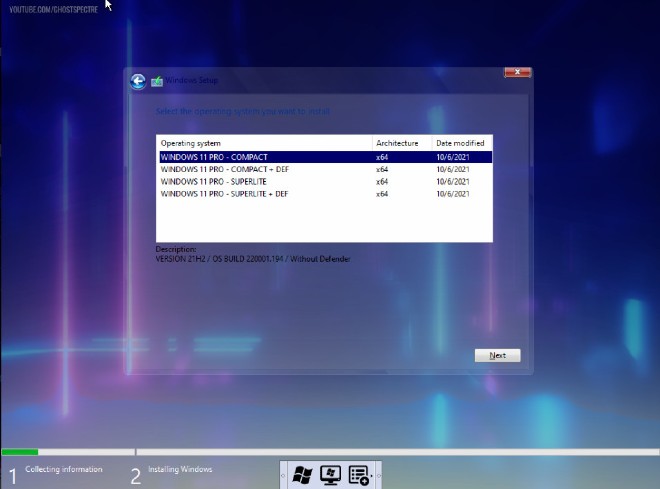
Windows 11 Pro version selection interface: SuperLite/Compact
GHOSTSPECTER's Windows 11 SuperLite is a heavily optimized and space-reduced version of Windows 11. Therefore, users can install it on even modestly configured computers and laptops.
Details of features removed, added, etc.Windows 11 SuperLite
Other advantages of Windows 11 SuperLite include:
Does not require the computer to have TPM 2.0, a Microsoft-supported CPU, or Secure Boot
Reduce the download and installation file size
Optimized to use the smallest amount of RAM possible
Optimize so that the "Full Disk" phenomenon on HDD is avoided
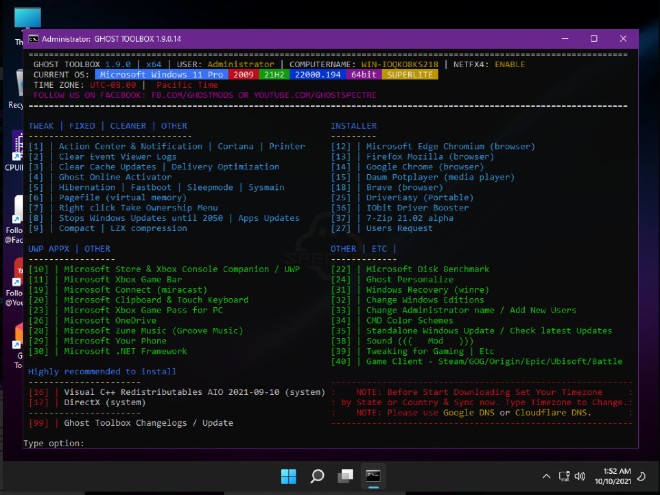
Enable Performance mode and add the Ghost tool
Multi-language support
Pause Windows Update until 2077
Turn off Windows Defender
Turn off Remote Desktop
Delete OneDrive
Turn off Action Center
Turn off User Account Control
Along with other features...
However, because of the removal of some components from the official Windows 11, Windows 11 SuperLite will have some disadvantages as follows:
Must do a fresh install, can't upgrade from Windows 10
Only GhostSpimmer updates; Windows Update does not work
Inadequate security because numerous related features have been disabled or removed.
Ability to handle work may be affected
Along with a few other problems...
Besides Windows 11 SuperLite, GHOSTSPECTER also released a shortened version of Windows 11 Compact compared to the SuperLite version. The Compact version will retain only the most basic and important components of the operating system.
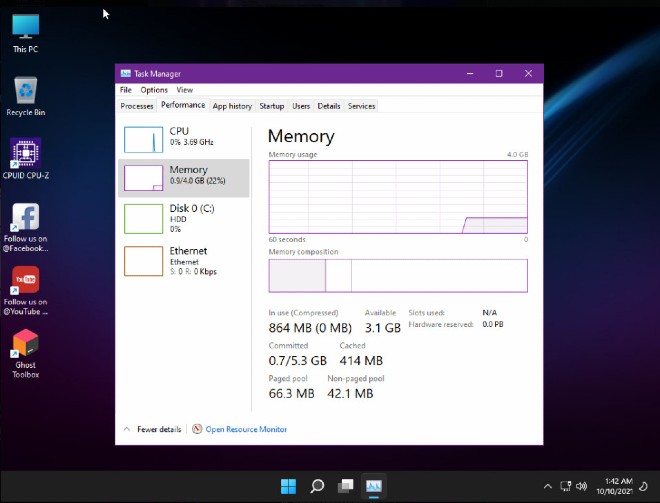
Windows 11 SuperLite consumes very little RAM
Both the SuperLite and Compact versions will provide two options: having Windows Defender or removing it at your discretion. If you are interested, you can download and consult information about Windows 11 SuperLite and Compact through the links below. If required, you can try the following passwords:
update 4: ghostU49123
update 5: W11QWERTQWQU5
update 6: W11QWERTQWQU6
update 7: W11QWERTQWQU7
update 8: W11QWERTQWQU8
update 8.1: W11QWERTQWQU81
update 9: W11QWERTQWQU9
Home: forhomewin11
Download Windows 11 Pro - SuperLite/Compact Custom WinPE
Download Windows 11 Pro - SuperLite/Compact Normal
More information about Windows 11 SuperLite or Compact
One of the "worst" problems that users often encounter on Windows 10 is the black screen error.
The black screen error can occur in some situations on Windows 10, stemming from problems related to the graphics card, the connection error between the computer and your monitor, the error occurring during the installation of the operating system, updating to new versions, etc., or simply happening randomly at any time.
In the article below, the administrator will guide you with some solutions to fix the black Windows 10 screen error.
In addition, if you encounter a black screen error on Windows 7, 8, or 8.1 computers, readers can refer to the steps to fix the error here.
Steps to fix a basic black Windows 10 computer screen
1. Black screen error during installation
Once there, try turning off the computer by pressing and holding the power button for a few seconds. If using a laptop, you can unplug the charger and remove the battery.
Unplug all unnecessa...
Microsoft is currently A/B testing a native dark style for the ChatGPT-powered Bing.com, and it has finally begun distributing out Bing.com to Google Chrome and Safari. On Windows 10 and 11, we got a pop-up that allowed Bing AI access through Google Chrome. It appears that certain people can also access Bing AI through Safari.
One of the most cutting-edge and effective language models for users is Bing AI, which is powered on ChatGPT-4. Since late February, Bing.com AI support has been accessible to Microsoft Edge users. Now, Microsoft is beginning to expand its support to all browsers, including Google Chrome and Apple Safari.
Bing AI pop-up in Chrome | Image Courtesy: Thewindowsfan.com
Anyone may now test Bing AI in Chrome thanks to a new pop-up that has begun to show in the taskbar of Windows 10 or 11. In our experiments, Google Chrome's native dark mode support allowed us to access Bing AI. The screenshot below illustrates how the white background changes to a black...
Windows 11 is considered more beautiful and aesthetically pleasing than Windows 10. However, not everyone likes the new things that Windows 11 brings. If you have already upgraded to Windows 11 but do not like its interface and do not want to return to Windows 10, you can try the customizations below.
Customizing the interface, also known as a custom interface, is not as popular as before. However, it is still very useful in case you want to refresh your computer. In this article, the administrator will show you how to customize the Windows 11 interface to become macOS.
A video tutorial on customizing the Windows 11 interface to become macOS was made by YouTube channel Tech Rifle. To be successful, you will have to combine a variety of custom software, tools, and themes. This process requires you to perform meticulously and accurately. If only one step is wrong, the results will not be as expected, and the installation process will not be successful.
Things you need to p...



Nhận xét
Đăng nhận xét