The error code 0xc000007b for opening applications and games does not often appear on the computer, but it affects users when we cannot open the program. Then the application interface displays the error message. The application was unable to start correctly. This error can be caused by some missing system files or by corrupted driver software. The following article will guide you on how to fix error 0xc000007b when opening applications on Windows.
How to Resolve the Error "The Local Account Cannot Open Windows 10 Applications"
Quick fix for error "All files converted to .lnk files"
How to run old software on Windows 10 using Compatibility Mode
Instructions to fix blue screen errors on computers
What is causing the error 0xc000007b?
In addition, third-party antivirus programs that cause conflicts with executable files and affect their operation can cause this error. On the other hand, the registry can be corrupted due to malware and viruses that also cause programs to not function properly. Or sometimes, a problem hardware driver can also be the culprit causing this error.
In addition, third-party antivirus programs that cause conflicts with executable files and affect their operation can cause this error. On the other hand, the registry can be corrupted due to malware and viruses that also cause programs to not function properly. Or sometimes, a problem hardware driver can also be the culprit causing this error.
Instructions to fix error 0xc000007b on Windows
Full message for error 0xc000007b The application was unable to start correctly (0xc000007b). Click OK to close the application, as shown below.
1. Restart your Windows computer
In most cases, restarting Windows will fix a number of problems, including application crashes and various errors. If something happens to the system that prevents the application from starting correctly, a simple reboot can fix the problem. Please restart Windows and check if the problem is resolved. If that doesn't work, move on to the next solution.
2. Run the application as Administrator
Some games or applications, when running in the usual way, will get the error 0xc000007b. If so, try running the application and the game under Admin.
Step 1:
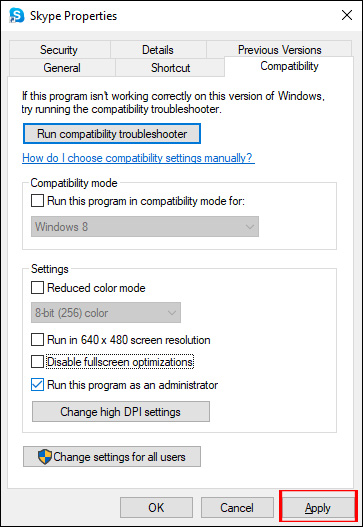
First, right-click the application that fails at startup and then select Properties.
Step 2:
We go to the Compatibility tab to see the new interface. Continue to check the line. Run this program as an administrator, and then click Apply to save the changes.
3. Reinstall the app
If you are receiving the error "The application was unable to start correctly, 0xc000007b" with only a single application (for example, VLC media player), reinstalling the application should help fix the error. Because, while upgrading, the application you want to run may contain a faulty component. In this case, you should uninstall the app completely and then reinstall it. Then run the program and see if the problem is resolved.
4. Fix error 0xc000007b with All in one Runtimes
All in one Runtimes software will fix system errors with missing files such as dlls, config files, etc. or corrupted error control software such as Visual C++, missing Net Framework or DirecX.
Step 1:
You download the All in one Runtimes software according to the link below and then proceed with the installation as usual.
Step 2:
After installing the tool, at the interface, we click on the Installation tab. Display the list of missing application packages on the computer, and tick all those packages. Click the Installieren button to install those packages.
We wait for the installation to complete and then restart the computer to apply the changes.
5. Restore damaged system files
Corrupt system files cause various problems on Windows computers, including error 0xc000007b. The article strongly recommends that you run the Windows SFC utility to scan and repair corrupted system files. Refer to Using SFC command to fix Windows 10 system file errors for more details.
Repair corrupted system files with SFC
6. Tweak the Windows Registry
If the above methods do not fix the problem, then tweak the registry by following the steps below to get rid of this error.
To do this, open the Windows Registry Editor by pressing the Win + R key, typing regedit, and pressing the Enter key. You should back up the registry database before making any modifications.
When you're ready, navigate to the following location:
Double-click on AppInst_DLLs and set it to an empty value. Close Registry Editor and restart the computer.
So you have many different ways to fix error 0xc000007b when launching applications on Windows. Another option is to manually update the.NET framework or reinstall DirectX.
We hope this article was helpful to you!
One of the "worst" problems that users often encounter on Windows 10 is the black screen error.
The black screen error can occur in some situations on Windows 10, stemming from problems related to the graphics card, the connection error between the computer and your monitor, the error occurring during the installation of the operating system, updating to new versions, etc., or simply happening randomly at any time.
In the article below, the administrator will guide you with some solutions to fix the black Windows 10 screen error.
In addition, if you encounter a black screen error on Windows 7, 8, or 8.1 computers, readers can refer to the steps to fix the error here.
Steps to fix a basic black Windows 10 computer screen
1. Black screen error during installation
Once there, try turning off the computer by pressing and holding the power button for a few seconds. If using a laptop, you can unplug the charger and remove the battery.
Unplug all unnecessa...
Microsoft is currently A/B testing a native dark style for the ChatGPT-powered Bing.com, and it has finally begun distributing out Bing.com to Google Chrome and Safari. On Windows 10 and 11, we got a pop-up that allowed Bing AI access through Google Chrome. It appears that certain people can also access Bing AI through Safari.
One of the most cutting-edge and effective language models for users is Bing AI, which is powered on ChatGPT-4. Since late February, Bing.com AI support has been accessible to Microsoft Edge users. Now, Microsoft is beginning to expand its support to all browsers, including Google Chrome and Apple Safari.
Bing AI pop-up in Chrome | Image Courtesy: Thewindowsfan.com
Anyone may now test Bing AI in Chrome thanks to a new pop-up that has begun to show in the taskbar of Windows 10 or 11. In our experiments, Google Chrome's native dark mode support allowed us to access Bing AI. The screenshot below illustrates how the white background changes to a black...
Like Windows 10, Windows 11 also supports HDR image export. But unlike Windows 10, HDR works better on Windows 11 and deserves to be enabled on some apps.
There are three ways to enable HDR on Windows 11, and the administrator will guide you through all three in the article below.
How to check if your computer/monitor supports HDR
HDR is a feature of the monitor. Therefore, your TV or monitor must be equipped with hardware components to display an HDR image. On Windows 11, you need to meet a few requirements for HDR to work:
An HDR display that supports the HDR10 standard
At least one DisplayPort 1.0 or HDMI 2.0 cable and a GPU that supports the above standards
PlayReady 3.0 is supported by GPU
How to enable HDR with keyboard shortcuts
The easiest way to enable HDR on Windows 11 is to use a keyboard shortcut. Since Windows monitors do not display HDR with good quality in many cases, the shortcut will help you quickly turn on / off HDR when needed.
T...




Nhận xét
Đăng nhận xét